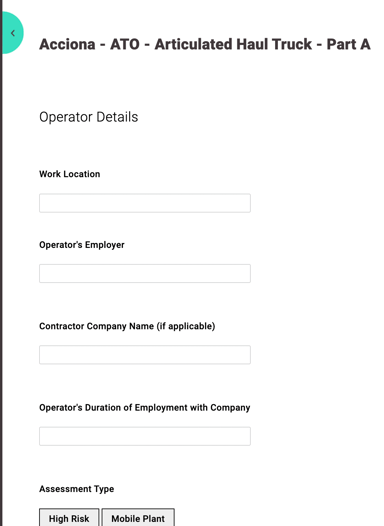
If the online form does not already exist, the developers will need to create it in the back end.
The form name MUST match the document type name in the system.
Process:
-
Check existing setup
Look in the system to see if Acciona - ATO - Part A is already set up at either the company level or project level.
If it is not, proceed with the steps below. -
Create the document type names (project specific)
Set up the required document type names in the system. -
Send document type names to the developers (Ant)
Provide the list of document type names so the developers can create the corresponding forms in the back end. -
Configure approval documents
Go to:
Admin > Manage Company > Company Details > Approval DocumentsBased on the requirements, select either All Projects or a Specific Project.
-
Select the approval/authorisation
Example: Acciona - ATO - Articulated Haul Truck - Part A -
Set the document requirement
Choose whether the document is to be set up as a required document or an alternative document.
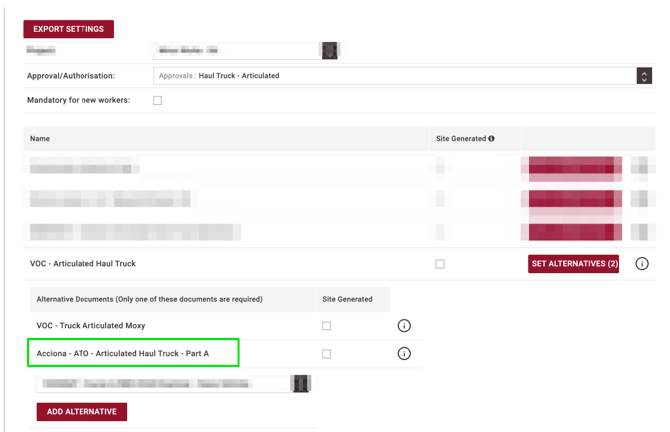
- It will appear in the worker’s profile under Approval Required Attachments.
On the left-hand side, you will see a paper icon next to the upload icon.

Alternative document option

- Complete the following form